Compatibility:
WebSite X5 Evo and Pro
The homepage is often the first page a visitor sees when arriving on your website. In just a few seconds, it must communicate who you are, what you do, and why your project deserves attention.
Many people think that an effective homepage must necessarily be complex or full of graphic effects. In reality, what truly matters is clarity: a good homepage guides visitors, highlights important content, and makes it easy to find useful information.
With WebSite X5, you can create a professional homepage in a completely visual way: choose the layout, organize the sections, add contents, and customize every element without writing code.
The main steps are:
- Define the goal of the homepage
- Organize the main sections
- Insert clear and readable contents
- Guide visitors with effective call-to-actions
- Optimize the display on smartphones
- Publish and improve the homepage over time
#tip - The homepage does not need to explain everything in detail: its main goal is to help visitors quickly orient themselves within the website.
How to create an effective homepage step by step
1. Define the goal of the homepage
Before even working on graphics or contents, it is important to understand what role the homepage should play within the website.
For this reason, the first question to ask yourself is: “What should visitors do after arriving on the homepage?”
The answer to this question helps you understand which contents to highlight on the homepage and how to organize them.
For example:
- a professional might want to guide visitors toward a contact request;
- an e-commerce store toward purchasing a product;
- a restaurant toward making a reservation;
- a portfolio toward viewing completed projects.
Defining the main goal of the homepage from the beginning allows you to build a clearer, more effective, and easier-to-navigate structure.
#tip - If you start from a template or with the help of the AI in MagicSite, you already have a homepage structure to start from: you will only need to customize it according to your preferences and goals.
2. Organize the main sections
A well-organized homepage is easy to read and effective to navigate.
It is not necessary to include too much information: often, a clear and organized structure works better than a very complex page.
There is no mandatory structure, but many effective homepages follow a similar scheme:
- A main introductory section (Hero)
This is the most visible part of the page, so it is advisable to include here:
- your business logo (if you have one);
- a clear title;
- a short description;
- a representative image;
- an action button (for example, “Discover our services”, “Request a quote”, “Book a consultation”, etc.).
- A presentation section
This section is used to better explain your business, project, or brand.
You can use texts, images, icons, and graphic elements. But you can also use galleries, animations, and videos. Choose the types of content that best help communicate what you want to convey.
- A section dedicated to services or contents
Here you can highlight services and products, as well as blog articles, your portfolio, or completed projects. The idea is that once visitors get to know you, they are ready to discover what you can offer them.
- A final section with contacts or call-to-actions
It is important to help visitors understand what the next step will be. The most effective way is to directly ask them to do what you would like, such as contacting you, subscribing to a newsletter, making a purchase, etc.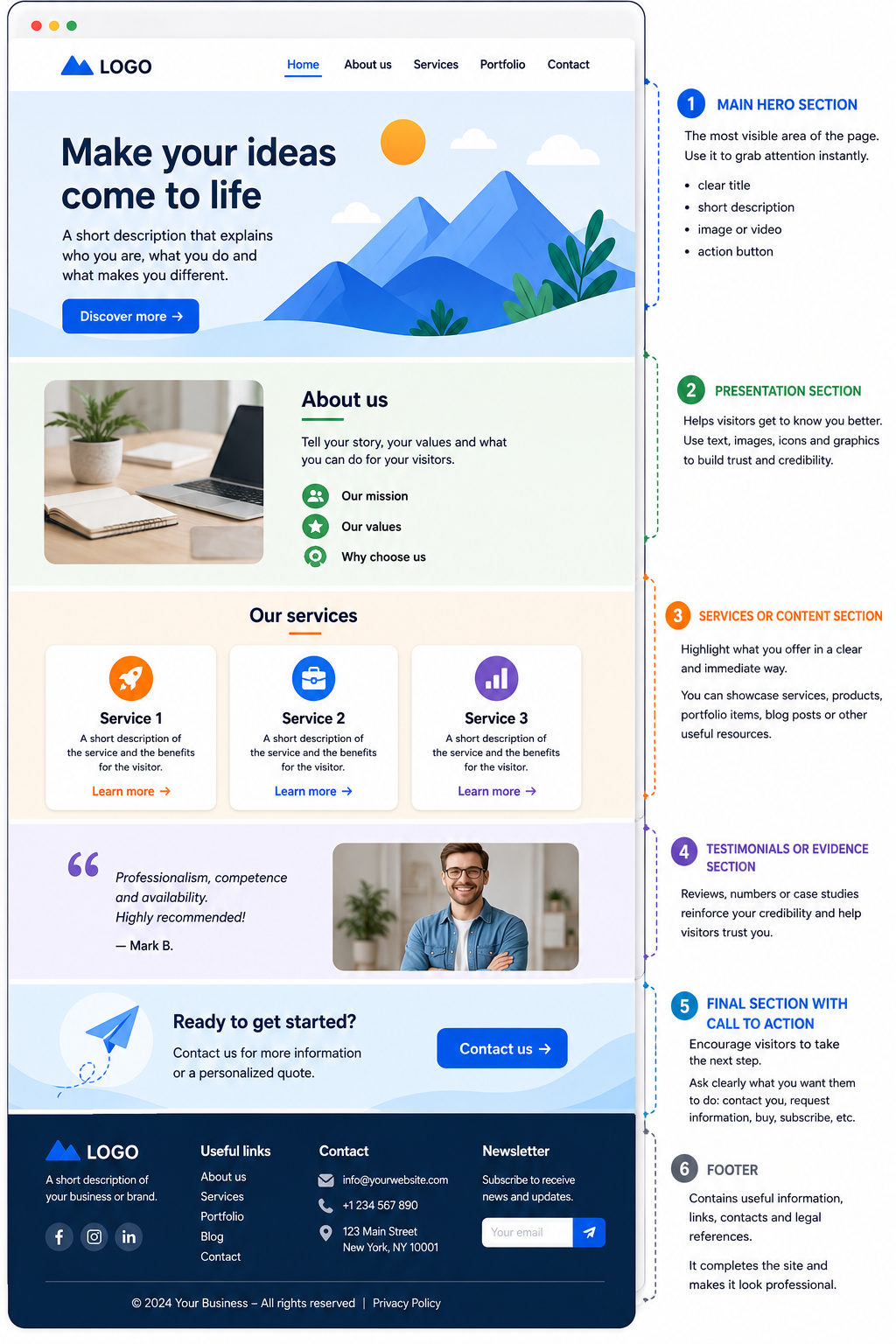
#tip - To easily organize contents, you can use the integrated Objects in WebSite X5, such as Text, Image, Gallery, Button, and Contact Form. Learn more with How do you insert content into a page?
3. Insert clear and readable contents
On the Web, reading is increasingly similar to scanning: visitors do not read pages from beginning to end, but tend to scroll through them quickly, focusing attention on titles and graphic elements that most attract their gaze.
If one of these elements sparks interest, visitors are likely to stop and spend more time reading the contents.
From this perspective, an effective homepage must be easy to scan and, above all, provide visual cues capable of immediately capturing attention.
To achieve this result, it is advisable to:
- use short and clear titles;
- avoid excessively long paragraphs;
- use images consistent with the project;
- maintain a consistent graphic style;
- highlight important information with colors and bold text.
With WebSite X5, you can insert and edit contents in a completely visual way using the Layout Grid and the available Objects. The many options for customizing styles and graphic settings help you create pages that are visually appealing, organized, and easy to browse.
#tip - If you use WebSite X5 Pro or Agency, you can use the AI of MagicText to generate texts, titles, and descriptions directly within the project.
4. Guide visitors with effective call-to-actions
An effective homepage does not simply present information: it must also guide visitors toward the most important action for your project.
For this reason, it is useful to include clearly visible elements that invite visitors to take the next step. These elements are called call-to-actions (CTAs).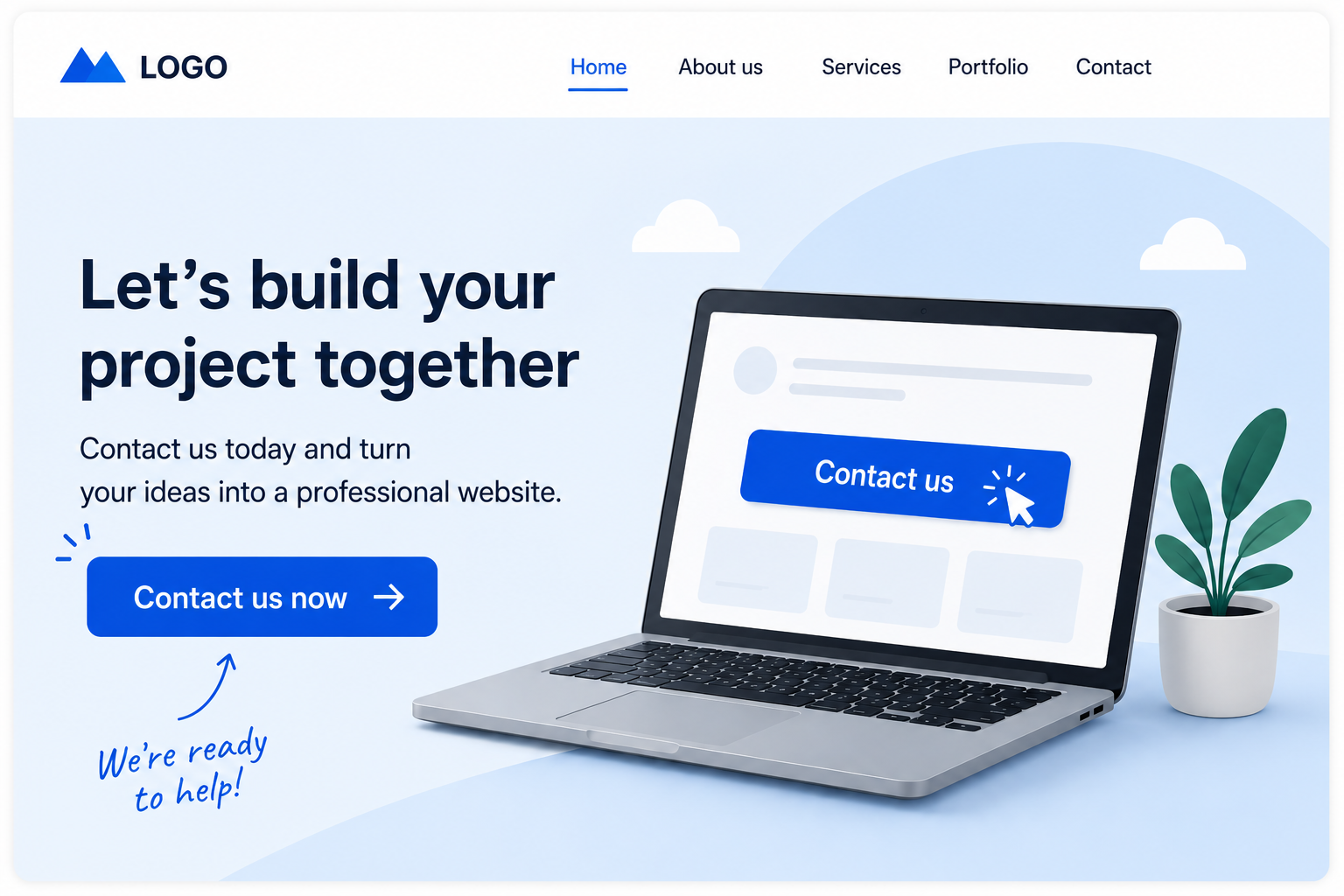
Call-to-actions are generally buttons or text links that help guide navigation and make the path to follow within the website clearer.
For example, you can use CTAs to invite visitors to:
- contact you;
- request information;
- book a service;
- purchase a product;
- read more in-depth contents;
- view portfolios or completed projects.
To achieve better results, call-to-actions should be:
- clearly visible within the page;
- written in a clear and direct way;
- consistent with the goal of the homepage;
- placed in the most important areas of the page.
With WebSite X5, you can easily create buttons using the main Button Object or optional Objects such as Animated Button, Download Button, or Hover Button. You can also insert hyperlinks within texts to guide visitors toward specific pages, sections, or contents. Learn how to do this by reading the guides in the Links section.
#tip - Avoid inserting too many different call-to-actions within the same section: simple and focused communication is generally more effective.
5. Optimize the display on smartphones
Very often, the homepage is visited for the first time from a smartphone. For this reason, it is important that, even on smaller screens, the main information remains immediately visible and easy to understand.
On mobile devices, the available space is limited: a homepage that is too crowded therefore risks becoming difficult to scroll and less effective in guiding visitors.
To achieve a better result:
- immediately highlight the title and the main message;
- avoid sections that are too long;
- use well-proportioned images;
- keep buttons and call-to-actions clearly visible;
- organize contents into clear and orderly blocks;
- remove or hide elements that are not strictly necessary on smaller screens.
With WebSite X5, the website is automatically adapted to mobile devices, but it is still important to check the behavior of the homepage through the local Preview.
A simple and well-organized homepage is generally more effective also for smartphone navigation.
#tip - You can find all the information on how to best manage the display of the website on mobile devices in the Responsive Design section.
6. Publish and improve the homepage over time
Many people think they need to complete a perfect homepage before publishing the website online. In reality, in most cases it is more useful to start from a simple structure and progressively improve the project over time.
Once the homepage is published, you can continue updating it easily:
- by adding new sections;
- by improving texts and images;
- by updating services and contents;
- by inserting new call-to-actions;
- by optimizing structure and navigation.
With WebSite X5, you can modify the project at any time while always working visually, without needing to edit the code.
After publication, you can progressively improve the homepage also by observing the real behavior of visitors through tools such as Google Analytics and Google Search Console.
By analyzing visits, the most viewed contents, and navigation methods, you can understand which sections work best and which ones should instead be optimized.
#tip - To learn more about these aspects, also see the guides dedicated to SEO and traffic analysis tools collected in the Analytics & SEO section.
Practical tips
An effective homepage does not necessarily need to be complex: often, the simplest solutions are also the clearest and most professional.
To achieve better results:
- immediately communicate what the website does;
- keep the structure simple and organized;
- use images consistent with the brand;
- avoid texts that are too long;
- include at least one clearly visible call-to-action;
- always check the mobile version;
- periodically update contents and information.
A well-designed homepage improves the visitor experience, strengthens the credibility of the project, and helps enhance the entire website.
In summary
The homepage is the main entry point of your website and has the task of guiding visitors in a clear and immediate way.
With WebSite X5, you can create a professional homepage in a completely visual way, organizing contents, images, and sections without writing code.
Starting from a simple and well-organized structure, you can build an effective, responsive homepage that is easy to update over time.