Compatibility:
WebSite X5 Evo and Pro
When you shop online, what is one of the first things you check? Reviews.
Comments and ratings left by other customers represent a form of “social proof”: they help reduce doubts, strengthen trust, and can make the difference between a product being added to the cart or abandoned.
Enabling reviews in your store means:
- increasing product credibility;
- providing useful information based on real customer experiences;
- improving user engagement;
- collecting valuable feedback to optimize your offer.
In this guide, we will see how to correctly enable and configure comments for your store products, so you can turn customer opinions into a concrete growth tool.
Enable comments on store products
If you have decided to allow visitors to leave a review on the products in your store, proceed as follows:
- At Step 3 - Map, select the Special Page "E-commerce: Product Page" and click the Edit button (alternatively, double-click on the page itself).
- Go to the Comments section and enable the option Allow comments on products.
- Specify the Comment management system you prefer to use. You can choose between:
- WebSite X5: this is the internal system of WebSite X5 and involves the use of a dedicated online Control Panel (see, How do you set up the internal WebSite X5 system for managing comments?).
- Facebook: uses the Facebook Social Plug-in to manage discussions and comments (see, How do you use the Facebook plug-in to manage comments?).
- Disqus: this is the system provided by Disqus (see, How do you use Disqus to manage comments?).
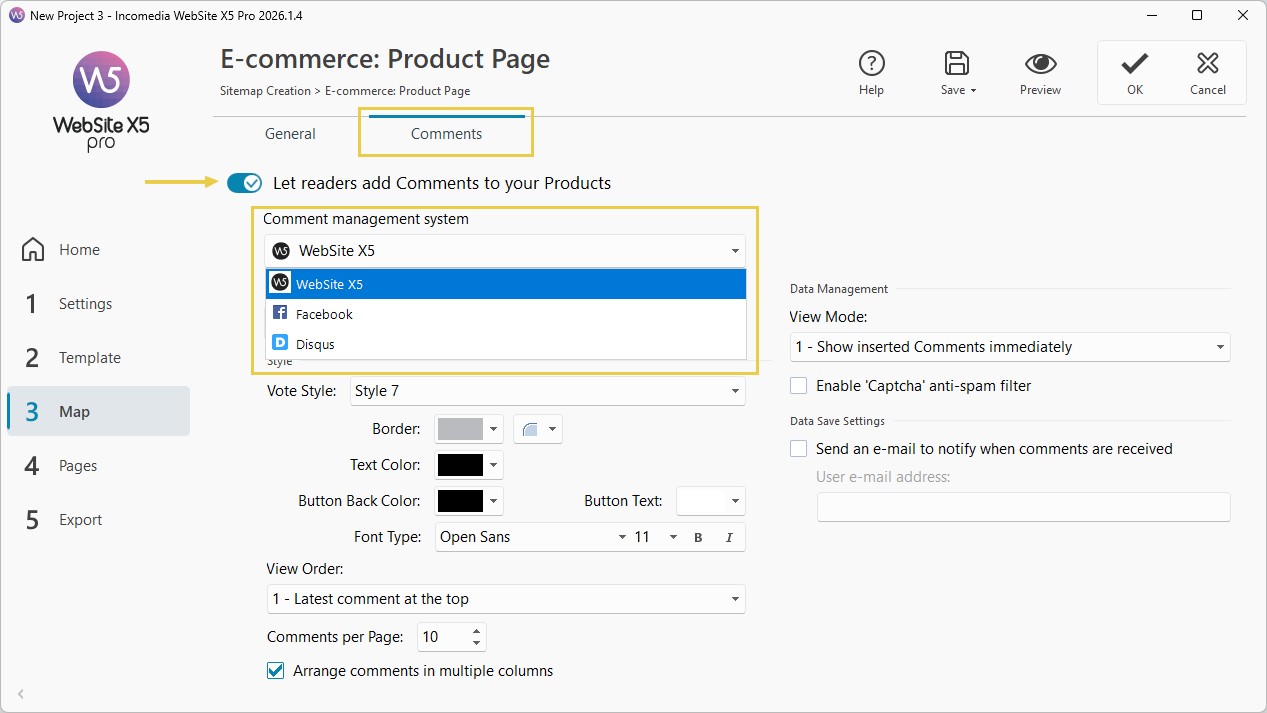
- Depending on the selected comment management system, set the parameters required to configure the service.
Once this is done, you can proceed with adding products and configuring your e-commerce.
On the Product Detail pages, a form will be automatically added through which your visitors can write and submit their comments and/or express their rating. Through this form, the following fields are required: Name, E-mail, and Message. All fields are mandatory.