Compatibility:
WebSite X5 Evo and Pro
Publishing a website does not automatically mean being found on Google.
Every day, millions of new contents are published online and, for your website to appear in search results, it is important to help Google understand its structure, topics, and quality.
This is precisely the goal of SEO (Search Engine Optimization): improving the visibility of the website on search engines through well-organized contents, optimized pages, and a clear and easy-to-navigate structure.
With WebSite X5, you can manage many SEO aspects directly within the project without needing to edit the code: from page titles to the XML Sitemap, from mobile optimization to integration with Google Analytics and Search Console.
The main steps are:
- Understand how SEO works
- Correctly organize structure and contents
- Optimize pages, texts, and images
- Use the SEO tools of WebSite X5
- Connect Google Analytics and Search Console
- Monitor results and improve the website
#tip - SEO does not produce immediate results: it is a progressive activity that improves over time thanks to the quality of the contents, the structure of the website, and the consistency of updates.
How to optimize a website for Google step by step
1. Understand how SEO works
When a user performs a search, Google analyzes billions of pages to decide which ones to show in the results.
To appear in search results, your website must first be:
- discovered by search engines;
- analyzed;
- correctly indexed.
Google uses automatic systems (often called crawlers or spiders) that visit web pages, read contents, images, titles, and links, and try to understand what the website is about, which topics it covers, and above all how relevant the contents are to users’ searches.
For this reason, SEO does not simply consist of inserting keywords, but of building pages that are clear, useful, and well organized.
There are truly many elements that Google takes into consideration; among the most important are:
- quality and clarity of contents;
- page structure;
- website speed;
- mobile compatibility;
- organization of internal links;
- content updates;
- overall browsing experience.
SEO therefore serves to make the website easier to understand both for Google and for real visitors.
With WebSite X5, many of the more technical aspects are already managed automatically: this way you can save time and focus mainly on the quality of the project and its contents.
#tip - A well-organized and easy-to-navigate website helps not only Google but also real visitors.
2. Organize the website structure and contents
One of the most important aspects of SEO is the website structure.
Google can generally better understand websites that have:
- clear menus;
- logically organized pages;
- consistent links;
- contents divided by topic.
For this reason, it is important to carefully design the website Map and organize the pages in a simple and intuitive way.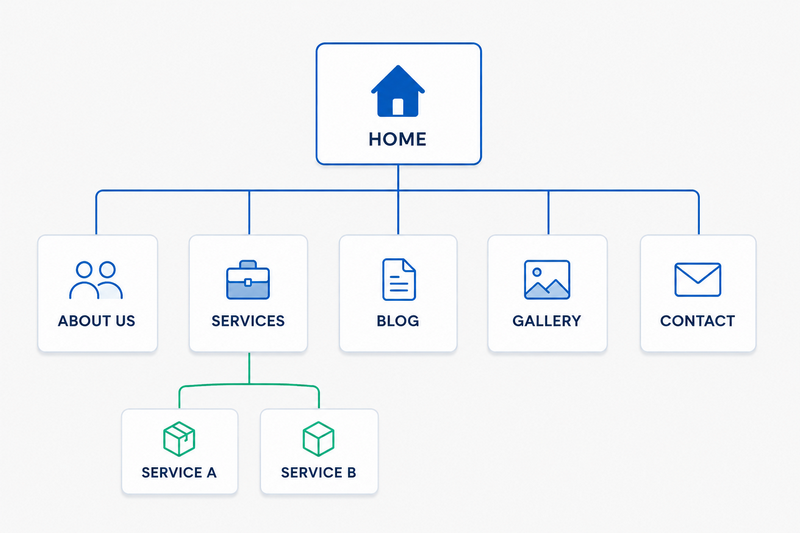
To design an effective structure, the best way to proceed is to start by asking yourself: “What information will visitors to my website look for?”
The answer to this question helps you understand which pages to create, how to organize them, which contents to highlight most, and consequently how to build the navigation menu.
In general:
- the Home Page should clearly present the project;
- the main pages should collect the most important topics;
- any subpages should go deeper into specific themes;
- the Blog can help develop additional contents and improve organic ranking.
With WebSite X5, you can easily manage the entire structure through Step 3 - Map: you can learn more about structure, menus, and navigation through the guides in the Map section.
#tip - A simple and consistent structure makes both user navigation and Google indexing easier.
3. Optimize pages, texts, and images
In addition to the overall structure of the website, contents, images, and the organization of individual pages also play a fundamental role in SEO.
When Google analyzes a page, it tries to quickly understand:
- what the main topic is;
- what information it contains;
- how useful and relevant the contents are compared to users’ searches.
For this reason, every page should be built in a clear and consistent way.
In general, it is important to:
- use clear and descriptive titles;
- organize texts and paragraphs well;
- avoid contents that are too long or confusing;
- use consistent and optimized images;
- maintain a structure that is easy to read even on smartphones.
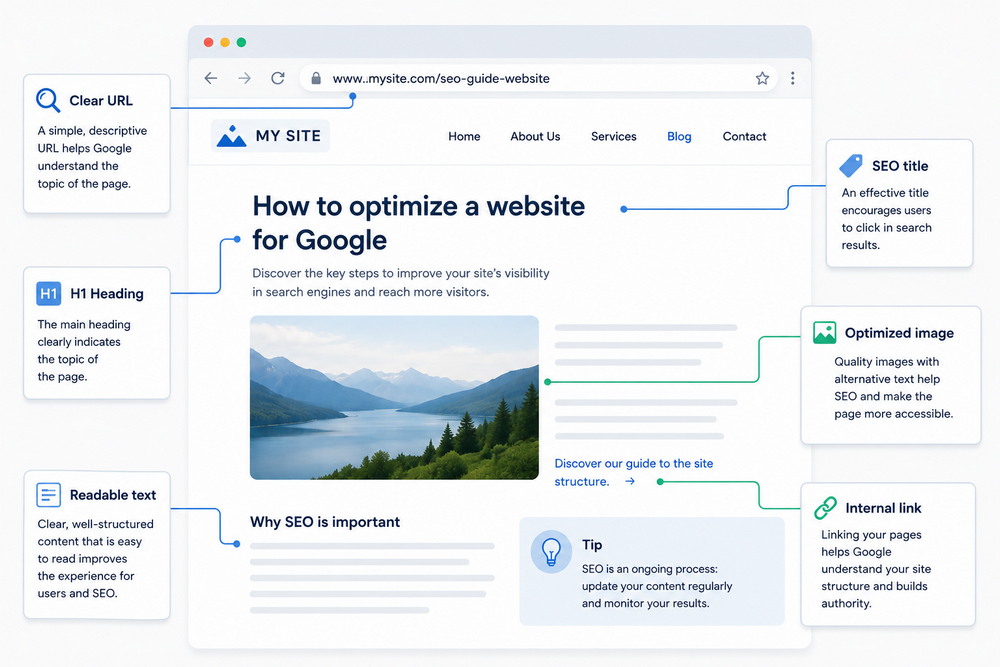
On the Web, reading is very fast: users often do not read a page from beginning to end but tend to scan it quickly, immediately looking for the most important information.
For this reason, it is advisable to:
- use short paragraphs;
- highlight the main concepts;
- use subtitles;
- maintain an organized and consistent graphic style.
Google does not read a page the way a person would: it mainly uses certain structural elements to understand its contents.
Among the most important are:
- the SEO Title of the page;
- the Description shown in search results (see: How do you manually set the Title and Description tags of a page?);
- the main and secondary headings of the content (see: How do you manage heading tags?);
- the URL of the page;
- the alternative texts of images (see: How to write alternative text for non-text contents on pages);
- internal links between the pages of the website (see: How do you create a link?).
Correctly filling in this information helps Google better understand the topic of the page and show it in the most relevant searches, and with WebSite X5 you can do this easily.
#tip - If you use WebSite X5 Pro or Agency, you can use the AI of MagicText to generate SEO titles, descriptions, and contents directly within the project.
4. Use the SEO tools of WebSite X5
We have seen how important content quality is, but there are also some more technical aspects that help Google correctly read, organize, and index the website.
Many platforms require manual actions or code modifications to manage these technical elements. With WebSite X5, however, most SEO features are already integrated directly into the project and can be managed through visual interfaces.
For example, the software allows you to easily work on important elements such as:
- XML Sitemap;
- robots.txt file;
- Open Graph settings for social media;
- mobile optimization;
- URL management.
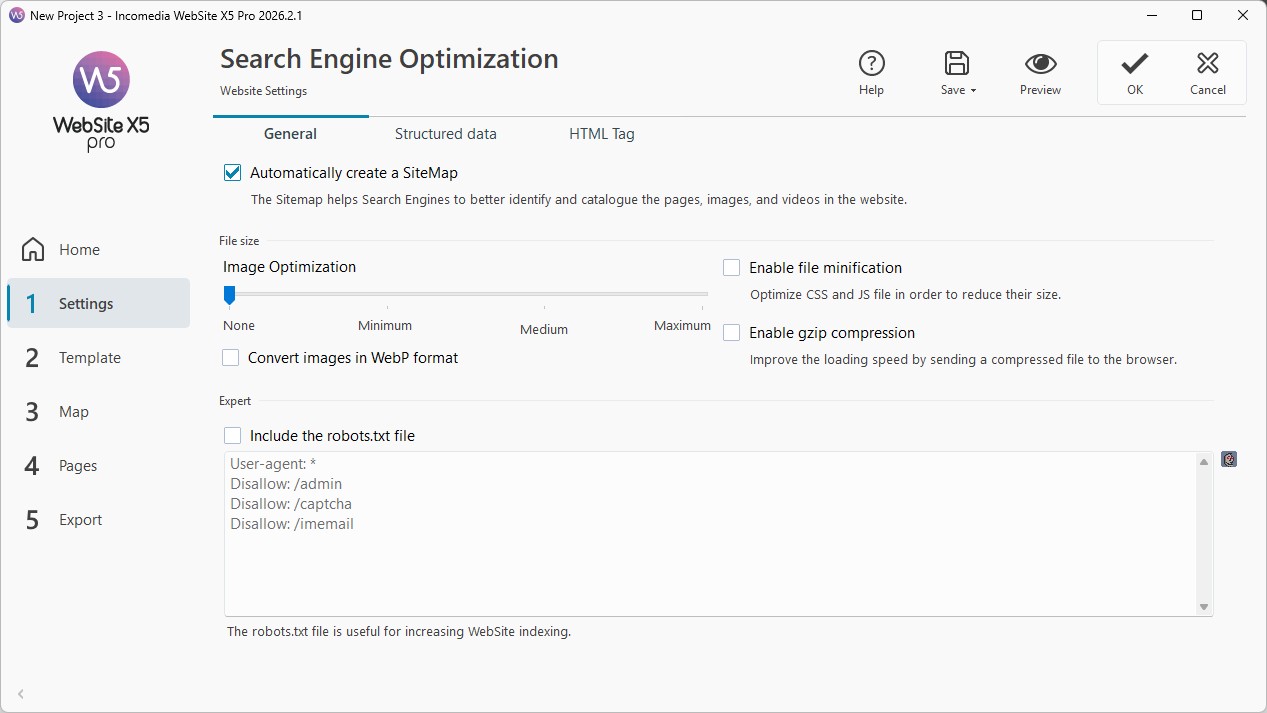
These tools help Google better understand:
- which pages should be analyzed;
- how contents are organized;
- which addresses should be used;
- how to correctly interpret the website.
#tip - In many cases, WebSite X5 automatically manages the main configurations, significantly reducing technical complexity even for users without specific Web development skills. You can learn more about these topics in the guides of the Analytics & SEO section.
5. Connect Google Analytics and Search Console
To truly improve SEO, it is not enough to make the first optimizations and publish the website: it is important to understand how users use it and how Google interprets it, so that you can continuously make adjustments.
For this reason, it is useful to connect the project to analysis tools such as:
- Google Analytics
It allows you to collect information about the real behavior of visitors. For example, you can understand:
- how many people visit the website;
- which pages are viewed most often;
- how long users stay on pages;
- which contents generate the most interest.
#tip - For more information, see How do you activate WebSite X5 Analytics statistics?
- Google Search Console
It is the tool through which Google directly communicates information about the website. Through Search Console, you can verify:
- whether the pages have been indexed correctly;
- which searches bring traffic to the website;
- possible SEO errors;
- crawling or indexing problems;
- website performance in search results.
#tip - For more information, see How do you verify a website to use Google Search Console™?
These tools are particularly useful because they allow you to make decisions based on real data and not only on personal impressions.
6. Monitor and improve the website over time
As already mentioned, SEO is not something you do only once.
Google tends to reward websites that are updated, well maintained, and continuously evolving. For this reason, it is important to regularly monitor the project and progressively improve it over time.
Over time, you can, for example:
- update existing contents;
- improve the most visited pages;
- optimize the Home Page;
- publish new Blog articles;
- check smartphone navigation;
- improve speed and readability;
- remove unnecessary or duplicated contents.
The data collected through Analytics and Search Console also help you better understand visitor behavior.
For example, you can discover:
- which pages attract the most traffic;
- which contents perform best;
- which searches bring users to the website;
- where visitors tend to abandon navigation;
- which pages require improvements.
This approach allows you to progressively improve the website based on the real experience of users and the indications provided by Google.
Even small continuous updates can produce important SEO improvements in the long term.
Practical tips
Good SEO comes from the balance between content quality, website structure, and user experience.
To achieve better results:
- use clear and consistent titles;
- organize menus and pages well;
- avoid duplicated contents;
- optimize images and texts;
- take care of the mobile version of the website;
- regularly update contents;
- monitor data with Analytics and Search Console;
- publish new contents through the Blog;
- progressively improve the most important pages.
Remember that the goal of SEO is not only to “please Google”, but above all to offer useful, clear, and easily accessible contents to the people visiting the website.
In summary
Optimizing a website for Google means improving the structure, contents, and overall quality of the project to make it easier for search engines to understand and more useful for visitors.
With WebSite X5, you can manage many SEO aspects directly within the software thanks to integrated tools for website structure, contents, publication, and monitoring.
Through continuous updates, well-organized contents, and data analysis, you can progressively improve the visibility of the website and increase the online presence of your project.