Compatibility:
WebSite X5 Evo and Pro
Animations are an effective tool for making a website more modern, engaging, and clear in its communication. When used correctly, they help attract the user’s attention, improve the user experience, and enhance specific sections of the pages.
To further expand customization possibilities, WebSite X5 provides an Optional Object dedicated to integrating animations created with LottieFiles, an online platform that offers a wide collection of lightweight animations optimized for the web.
Thanks to this Optional Object, you can easily insert Lottie animations into your project pages, even if you do not have programming or animation skills.
In this guide we will see:
- What Lottie animations are and what they are used for
- The LottieFiles platform
- How to integrate Lottie animations in WebSite X5
What Lottie animations are and what they are used for
Lottie files are vector animations saved in JSON format, a lightweight and structured text format that mathematically describes shapes, colors, movements, and animation timing.
Unlike images or videos, a Lottie file does not contain pixels, but instructions that the browser interprets and renders in real time.
This approach offers concrete advantages compared to traditional formats such as GIFs or videos:
- Lottie files are much lighter than animated GIFs;
- quality always remains high because the animations are vector-based;
- there are no issues with blurring or loss of definition on high-resolution screens;
- animations are played smoothly even on mobile devices.
For comparison:
- A GIF is a sequence of raster images that quickly increases in size and loses quality when resized.
- A video requires more resources, longer loading times, and offers less graphical flexibility.
- A Lottie file (JSON) is lightweight, scalable, and optimized for the modern web.
#tip - The Lottie format was originally developed by Airbnb to efficiently manage complex animations within its web and mobile applications. It was later released as open source, encouraging widespread adoption also in the web environment.
Lottie animations are therefore particularly suitable for:
- enhancing the visual appearance of pages without slowing down loading times;
- drawing attention to specific elements, such as buttons or call-to-action elements;
- providing visual feedback to users, for example during content loading or action confirmation.
Thanks to these features, Lottie files represent a technical and effective solution for making websites more modern and dynamic, while maintaining high performance and an excellent browsing experience.
The LottieFiles platform
Once you understand what Lottie files are, it is natural to wonder where to find them, how to create them, and how to use them in your web projects.
LottieFiles is one of the main platforms dedicated to this format and offers a set of tools designed to cover all these needs.
In particular, through LottieFiles you can:
- Find ready-to-use Lottie animations, thanks to a large online library that includes thousands of free resources, organized by categories and styles, and usable also in professional projects.
- Access premium content and resources, available through paid plans, designed for those who work with animations on a regular basis or need more advanced solutions.
- Preview, test, and customize animations directly in the browser, thanks to an online editor that allows you to check the result before use.
- Download files in JSON format, ready to be integrated into web projects.
With WebSite X5, you can start using Lottie animations right away by relying on the free LottieFiles library, which is more than sufficient for most projects.
If in the future you need something more, you can always consider the advanced features and paid services offered by the platform.
How to integrate Lottie animations in WebSite X5
To use a Lottie animation within a WebSite X5 project, the first thing you need to do is find the desired animation through the LottieFiles platform.
By accessing LottieFiles you can:
- search using keywords or categories;
- preview the available animations;
- choose the animation that best suits your project;
- download the corresponding JSON file, which is the actual Lottie file.
Now that you have the Lottie animation saved locally on your computer, inserting it into your project using the Lottie Animation Object is very easy:
- Insert the Lottie Animation Object into the page and double-click it to open the window with all the options.
- Import the Lottie animation you want to use: in the Animation file field, click the
 button to browse for the file you previously downloaded locally. By clicking the
  button you can enter a title and alternative text useful for accessibility purposes as well as for SEO optimization of the page (see Image accessibility: the importance of alternative text).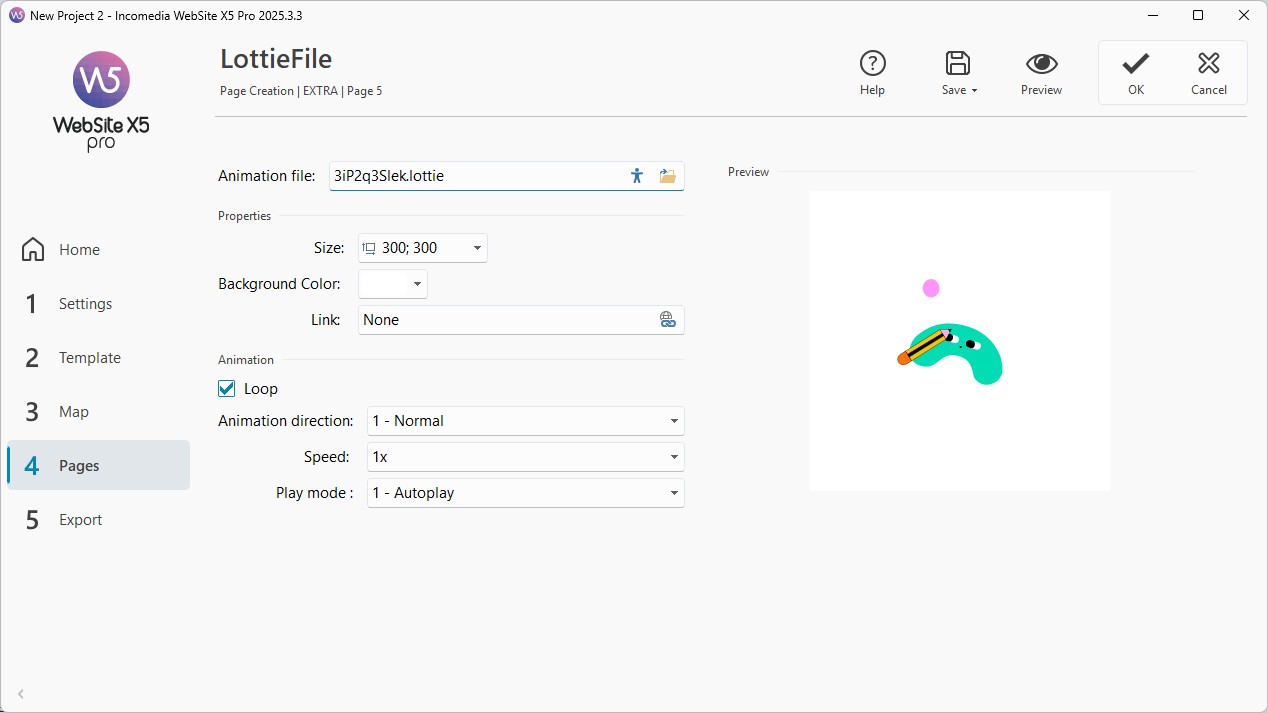
- At this point, you can define some Properties such as the Size and Background color of the animation. If you wish, you can also turn the Lottie animation into a button by adding a link: click the
 button and, in the window that opens, choose the action to associate with the link.
 - To ensure that the animation never stops, enable the Play in loop option.
- Finally, customize some parameters related to the behavior of the animation. Specifically, you can adjust:
- Playback mode: to choose the playback direction (forward, backward, bounce, etc.).
- Speed: to set the playback speed (speeding it up or slowing it down).
- Start type: to enable automatic playback or playback only on mouse hover.
- When you are satisfied, click the Ok button to confirm.
Can't wait to use it on your website pages? Install the Lottie Animation Object now
Don't have enough Credits to purchase this Object? See all Credit packages