Compatibility:
WebSite X5 Evo and Pro
When a visitor browses your website from a smartphone, it can be useful to let them contact you with a single click, without having to manually copy a number or other details.
In WebSite X5, you can create a Link that lets visitors start a call or send a message using one of the available providers (for example, WhatsApp, Telegram, etc.).
How to create a link to start a call or send a message
You can apply the Link to a text, an image, a button, or another element that supports this function.
To do this:
- Open the settings of the Object where you want to add the link.
- Click the
 Link button to open the corresponding window.
 - Select the Call/Message action.
- Choose the Provider you want to use.
- Depending on the selected Provider, choose the Action Type to offer the visitor.
- Enter any required parameters, such as the phone number or other necessary information.
- Confirm with OK.
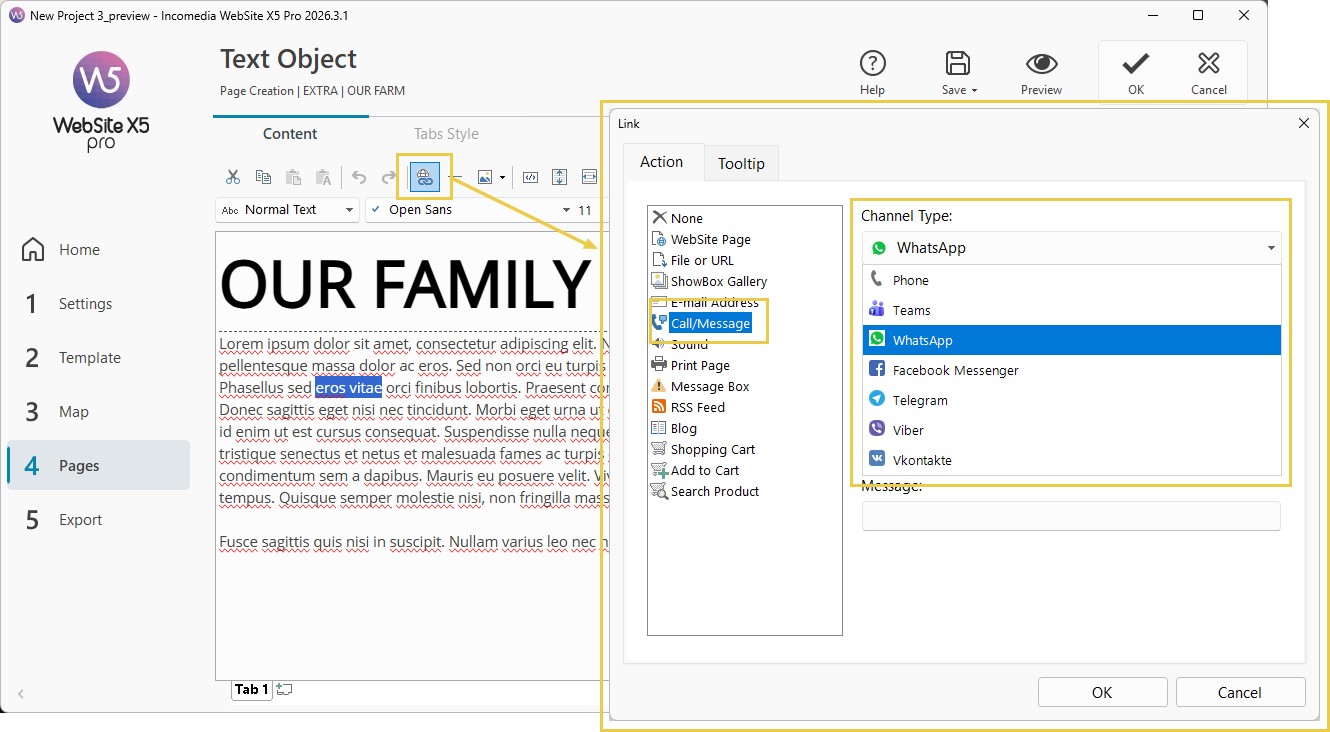
The available options may vary depending on the provider and the selected action type.
When the visitor clicks the Link, WebSite X5 opens the application or service on the device that is compatible with the selected action.
#tip - Mobile devices. This type of Link is particularly useful for visitors browsing the website from a smartphone. Always check the result on a real device, especially if you use third-party services or apps.
#tip - Mobile Contact. If you want to combine multiple contact methods into a single element designed for mobile browsing, you can use the Mobile Contact Optional Object.
#tip - For an overview of the other types of links available, see Links. How do you create a link?