Compatibility:
WebSite X5 Evo and Pro
Making contact information easily accessible helps visitors get in touch with you without having to manually copy an e-mail address.
In WebSite X5, you can create an e-mail Link that, when clicked, opens the mail program or app available on the device and prepares a new message. You can also predefine the recipient, subject, and message text.
How to create a link to send an e-mail
You can apply the Link, for example, to the e-mail address displayed in a Text Object.
To do this:
- Open the Text Object you want to work on.
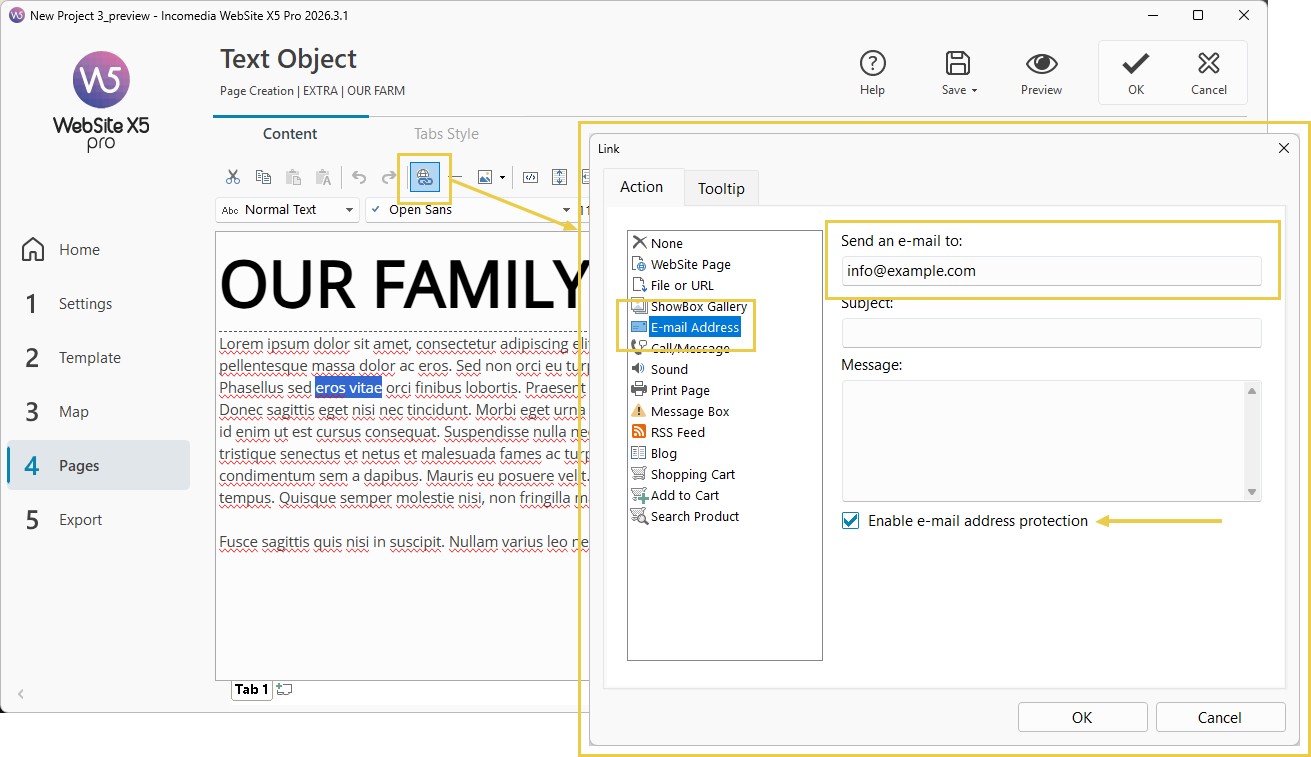
- Select the e-mail address or text you want to make clickable.
- Click the
 Link button to open the corresponding window.
 - Select the E-mail address action.
- Enter the recipient's e-mail address (the one where you want to receive e-mails from your users and which will probably be the same address published on the page).
- If you want, also specify a predefined subject and message content.
- Select the Enable e-mail address protection option.
- Confirm with OK.
When the visitor clicks the link, the mail program configured on the device opens with the information you have predefined.
How to protect the e-mail address
If you enable E-mail address protection, WebSite X5 inserts the specified address in encrypted form into the Page's HTML code.
This makes it more difficult for systems that scan Web Pages for contact details to use for spam operations to automatically recognize the address.
For this reason, it is advisable to keep this option enabled when you publish an e-mail address through a Link.
#tip - For an overview of the other types of links available, see Links. How do you create a link?